> For the complete documentation index, see [llms.txt](https://docs.cvg.finance/llms.txt). Markdown versions of documentation pages are available by appending `.md` to page URLs; this page is available as [Markdown](https://docs.cvg.finance/navigate-ui/staking/stake-dao/staking-cvgsdt/use-sdt.md).
# Use SDT
1. Select **`SDT`** as the token to deposit;
2. Enter the amount of **`SDT`** that you want to deposit;
3. Click the `Convert & Stake` button.
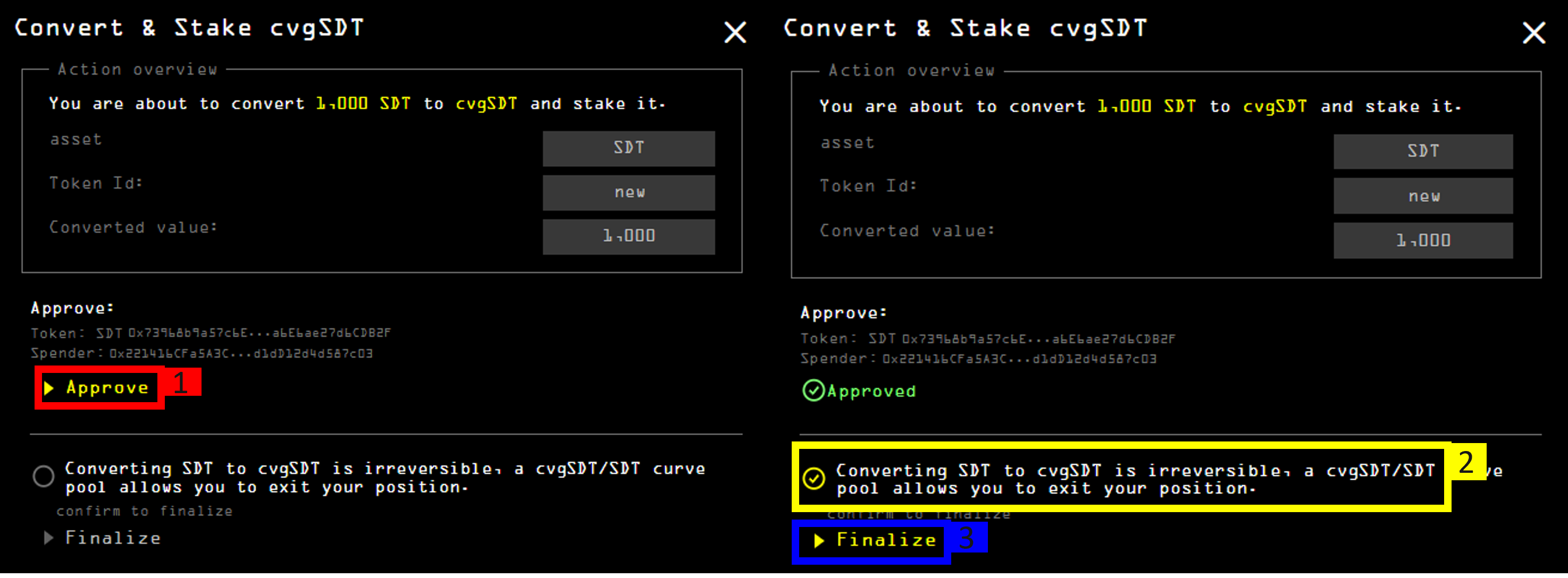
The confirmation pop-up will appear.
1. Approve the contract's allowance in your wallet. The `Finalize` button will become available;
2. Acknowledge that converting **`SDT`** to **`cvgSDT`** is irreversible;
3. Click the `Finalize` button and confirm the transaction in your wallet.